Last updated: 2026-10-08

PDF format

Marriage Biodata PDF | A4 Download & Print

A marriage biodata PDF is useful when the finished profile needs to be printed, emailed or forwarded without changing its layout. A4 sizing and readable text matter more than simply exporting a screenshot.

Quick answer

For a good marriage biodata PDF, use A4 portrait sizing, keep text selectable, reserve space for the footer and avoid shrinking the content so much that names and dates become difficult to read. Additional photos can be placed on dedicated pages.

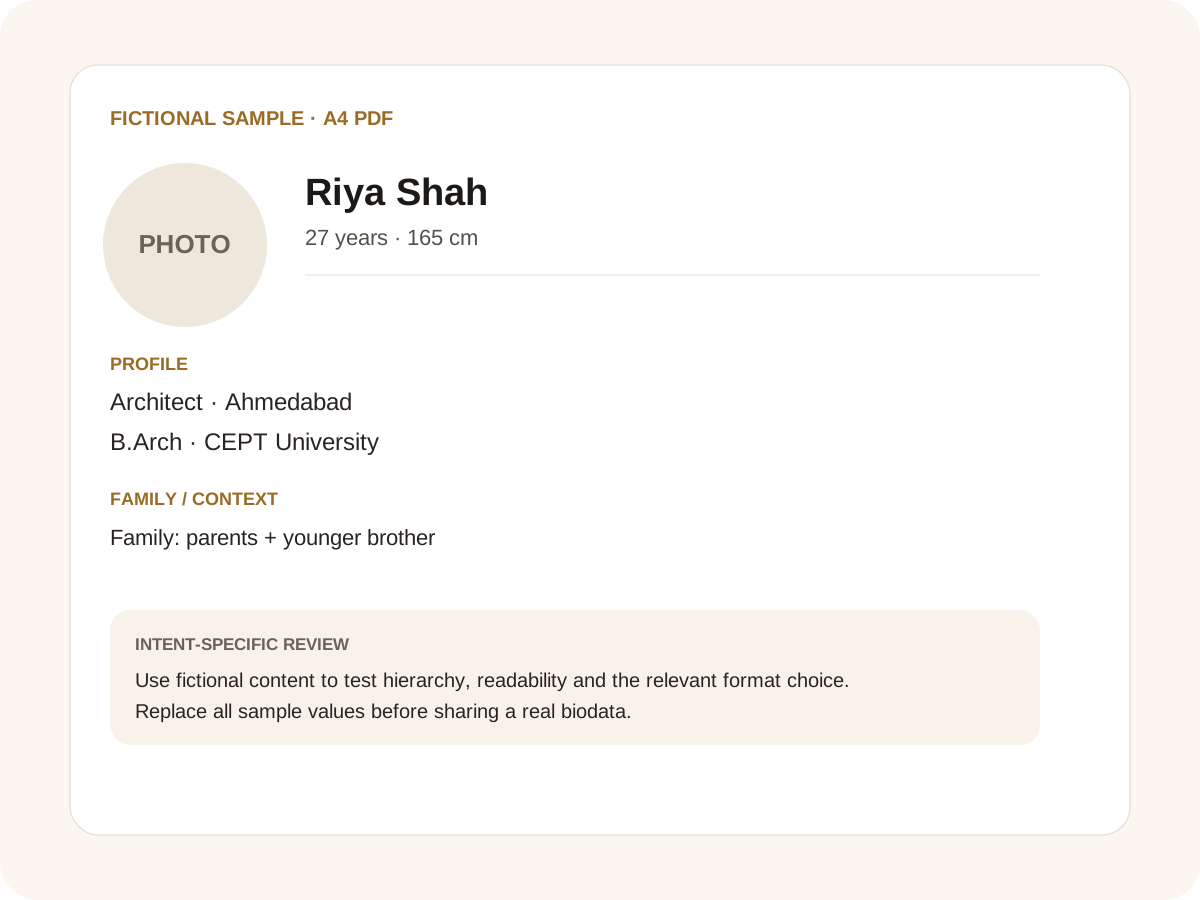
Fictional filled marriage biodata example for A4 PDF
Fictional sample for layout guidance. Replace every value with your own verified information.

Filled sample

What this example demonstrates

  • ✓ A print-ready one-page PDF
  • ✓ A two-page profile with a second photo page
  • ✓ A phone-tested PDF for family forwarding

Why A4 matters

A4 is familiar to Indian families, printers and office software. Designing around the actual page dimensions makes the PDF more predictable when someone prints it at home or at a local shop.

A one-page biodata is useful when the content fits comfortably. If it does not, a deliberate second page is better than squeezing everything into tiny type.

PDF versus PNG

PDF is the better choice for printing and formal sharing because the text can remain selectable and the page dimensions are explicit. PNG is useful for WhatsApp previews and situations where an image is easier to open.

For profiles with several photos, a clean PDF can use a main biodata page followed by dedicated photo pages. This keeps the primary information readable.

Check before sending

Open the exported PDF on a phone and desktop. Verify regional scripts, names, dates, phone numbers and the profile photograph. If the document has more than one page, confirm that the page break is intentional rather than caused by overflow.

Keep a source copy in the browser and regenerate the PDF if the profile changes. Avoid editing the exported PDF manually when the builder can recreate it consistently.

Common mistakes for this intent

  • • Checking only the editor and not the exported PDF
  • • Allowing text to become unreadably small
  • • Forgetting to check page breaks
  • • Including sensitive contact details in the first version

Practical examples to compare

  1. 1. A print-ready one-page PDF
  2. 2. A two-page profile with a second photo page
  3. 3. A phone-tested PDF for family forwarding

How to use a A4 PDF example

PDF intent is about the finished document rather than the form alone. A useful example therefore has to survive the transition from editable preview to a fixed A4 page. The fictional profile here is deliberately compact so you can inspect hierarchy, line wrapping and the amount of information that fits comfortably. A PDF should be checked at normal phone zoom and at print size; a beautiful editor view is not enough if the export clips a value or creates an awkward page break.

For this intent, the sample facts are deliberately fictional: Riya Shah is shown as the profile name, while the rest of the values establish a believable context without representing a real person. The example uses 27 years · 165 cm, Architect · Ahmedabad and B.Arch · CEPT University to show how personal, career and education information can sit together. The family line, “Family: parents + younger brother,” demonstrates the amount of context that can be supplied without turning the first page into a family directory. Replace every value with verified information before sharing.

Three situations this format can handle

Three practical ways to use this format are worth testing. First, a print-ready one-page pdf. Second, a two-page profile with a second photo page. Third, a phone-tested pdf for family forwarding. These are different use cases rather than three versions of the same paragraph: one prioritises the information hierarchy, another changes the family context or audience, and the third tests how the design behaves when an optional requirement is introduced. Keeping those choices explicit makes it easier to explain why a particular template or field order was selected.

Review the finished A4 PDF profile

The most useful review is a content review followed by a rendering review. Check the facts, spelling, dates, relationships and location first. Then inspect the final page at the size at which a parent or prospective match will actually read it. For this page, pay particular attention to A4 PDF: it should be visible enough to answer the searcher’s question but should not overwhelm the rest of the profile. If a detail does not help a genuine first introduction, remove it rather than shrinking everything else.

A practical checklist

  • ✓ A4 portrait page
  • ✓ Readable text at normal zoom
  • ✓ Selectable text
  • ✓ Profile photo positioned cleanly
  • ✓ Additional photos on intentional pages
  • ✓ Footer without overlap
Start a free biodata

Related biodata resources

Frequently asked questions

Yes. The builder uses the browser print flow so the finished document can be saved as an A4 PDF.